
Help · employees and cross-border workers
How to count your days outside Luxembourg
Everything you need for the calculator, the counter, the homeoffice.lu – 34 days app and the personal link from your employer. Working in HR? The employer manual is in the next tab.
No chapter matches. Try another word or write to us.
1The 34-day rule in short
What counts, what doesn’t, and why day 35 changes everything.
If you live in France, Belgium or Germany and work for a Luxembourg employer, your salary stays taxable in Luxembourg as long as you work no more than 34 days a year outside Luxembourg. On day 35, it is not just the extra days that become taxable in your country of residence: every day worked outside Luxembourg does, from the first.
What counts as a day outside Luxembourg
- Home office at home or anywhere else outside Luxembourg.
- Business trip, work at a client abroad.
- Training outside Luxembourg.
- Other work abroad (trade fair, meeting, site visit…).
- A working day that starts in Luxembourg and ends elsewhere generally counts as a full day outside Luxembourg.
What doesn’t count
- Days worked in Luxembourg.
- Holidays, public holidays and weekends you don’t work.
- Sick days.
Part-time and joining during the year
The threshold is reduced in proportion to your working time and, in the year you join or leave, to your period of employment. homeoffice.lu always rounds down, to be safe.
| Situation | Calculation | Threshold |
|---|---|---|
| Full-time, whole year | 34 × 100 % | 34 days |
| Part-time 80 % | 34 × 80 % = 27.2 | 27 days |
| Part-time 50 % | 34 × 50 % = 17 | 17 days |
| Joined on 1 July, full-time | 34 × 184/365 = 17.1 | 17 days |
Social security: a separate rule
To stay covered by Luxembourg social security (CCSS), home office in your country of residence must stay below 49.9 % of your working time. With 230 working days, that is at most 114 home office days. Business trips and training don’t count here. It is a different counter from the tax threshold: you can go over 34 days without affecting your coverage.
2The calculator on the home page
Know in ten seconds how many days you have left.
- Choose your Country of residence: France, Belgium or Germany.
- Enter your Contractual working time: 100, 80, 75 or 50 %.
- Use + and − to set the Days already worked outside Luxembourg this year.
- Enter your Planned remote days per week to see when you will reach the threshold.
The result appears at once: days left, status (Comfortable margin, Getting tight from 5 days left and at the threshold, Threshold exceeded) and the social security bar at 49.9 %. That bar uses all the days entered; for social security, only home office days actually count.
Print or save as PDF creates a clean page for your records. Email the PDF sends it to you: the address is only used to send it, nothing is stored.
3My counter in the browser
A personal calendar with no account, which stays on your device.
Below the calculator, My counter is a calendar of the year where you mark each day outside Luxembourg. The data stays in your browser on this device: nothing is sent to homeoffice.lu.
- Choose a mode: Home office, Business trip / training or Clear.
- Click the days concerned. Weekends cannot be clicked.
- The total is carried over automatically to the calculator above.
The last four days before the threshold are highlighted; a warning appears when 5 or fewer are left.
The buttons
- Share my counter creates a square image of your status, handy for a message.
- Send to my HR team prepares an email to your HR team with a link to the employer offer.
- Export (CSV) downloads the list of your days for Excel or your records.
- Clear the year resets everything after confirmation.
4The homeoffice.lu – 34 days app
Free, no account, no ads. It asks you one question in the evening and keeps count for you.
The app for iPhone and Android is free, with no purchases or ads, and works without an account. The download links, the full presentation and the PDF guide are on the The app page.
Day to day
- The evening question: at 7 pm (adjustable) a notification asks where you worked. Answer right in the notification: home office, Luxembourg or business trip.
- The Friday check at 5 pm, if you turn it on.
- An alert when only 5 days are left, and at the threshold.
- The widget shows the days left on your home screen.
- Workplace detection (optional): if your phone was at your workplace, the app doesn’t ask at all. Location is analysed on the phone only; per day, only “Luxembourg yes/no” is kept.
Your records
The app creates an annual statement as PDF with your name and signature, and a CSV export. You can add a note to each day (client, hotel, training…).
Linking the app to your employer
If your employer uses homeoffice.lu, they give you a QR code or a personal link. In the app: Settings → Link to my employer → scan the code or paste the link. Your confirmed days are then sent to your HR team (date, type and any note, never location). HR entries take precedence: if HR has already entered a day, the app shows their version.
5Your employer’s personal link
If your company uses homeoffice.lu, you record your own days, with no account or password.
Your HR team sends you an email “Your home office days at …” with a personal link, or shows you a QR code. The link opens your calendar, and only yours.
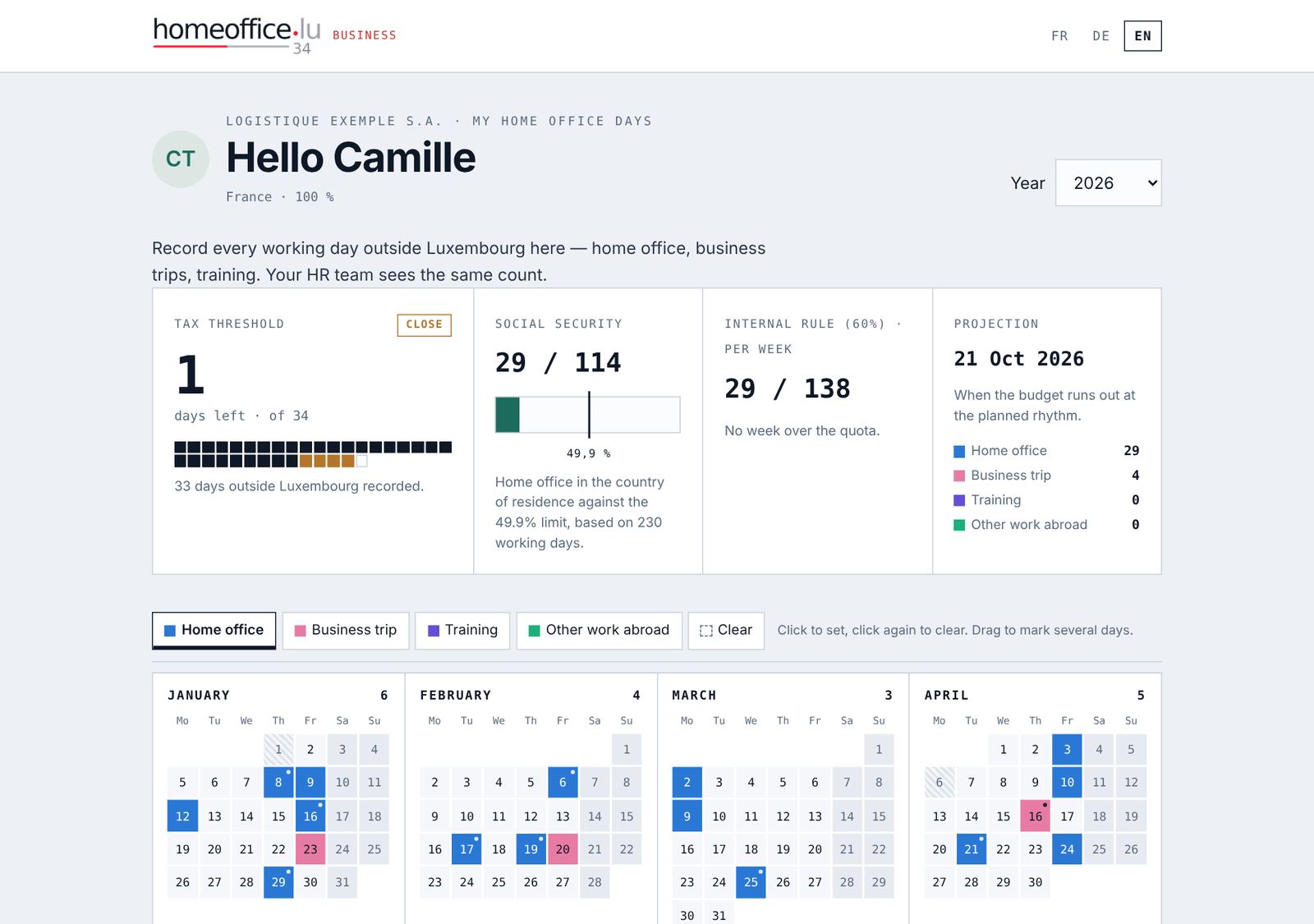
Recording your days
- Choose the type of day: Home office, Business trip, Training or Other work abroad.
- Click a day to mark it, click again to clear it. Drag across several days to mark them in one go.
- Saving is automatic: “Saved” appears at the top of the calendar.
For a regular pattern, open Enter recurring days in one go: for example every Friday home office from 1 September to 31 December. Weekends and Luxembourg public holidays are skipped automatically.
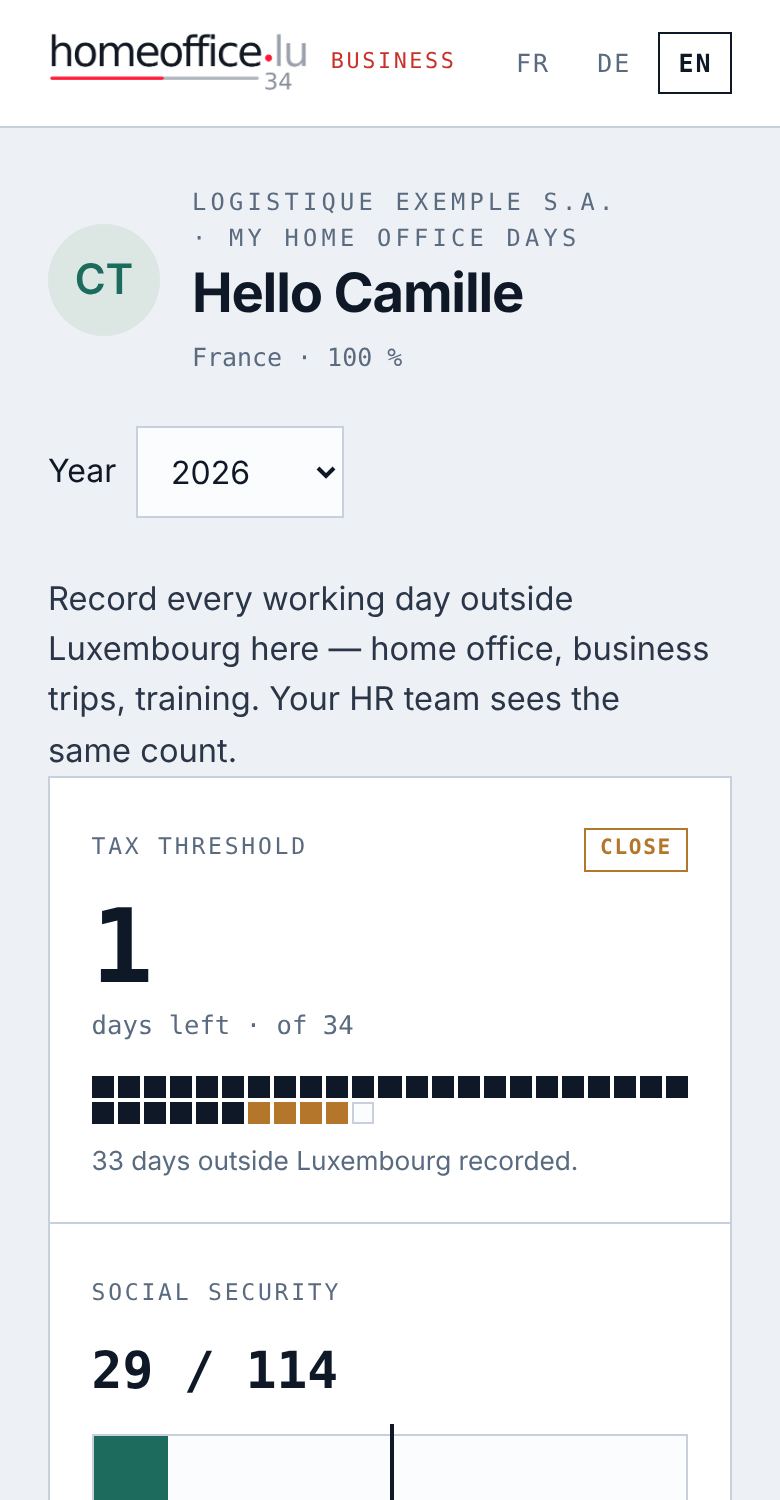
Good to know
- Only enter days worked outside Luxembourg. Holidays, sick days and days in Luxembourg stay empty.
- Days entered by HR take precedence: you cannot change them. If a day looks wrong, talk to your HR team.
- Annual statement (PDF) downloads your statement with two signature lines (employee and employer).
- Your employer sees your days and their type, never the exact place.
- Don’t pass the link on: anyone who has it can enter days in your name.
- The same QR code also links the app to your employer (chapter 4).
6Your data
- Calculator and counter: everything is calculated in your browser. Nothing is stored on our side.
- App: your days stay on the phone. Nothing is sent until you link the app to an employer.
- Employer link: your days are stored for your employer, who is responsible for them. They see date and type, never your location.
- Email alert: your address is only used to write to you. Every email contains an unsubscribe link that deletes your sign-up.
Details and your rights (access, correction, deletion): see Legal notice and privacy and Privacy – app.
7Frequently asked questions
Does a day spent half in Luxembourg count?
As a rule, a working day spent partly outside Luxembourg counts as a full day outside Luxembourg. Enter it, and check with your HR team whether anything different applies to you.
Do business trips count for social security too?
No. The 49.9 % limit only concerns home office in your country of residence. Business trips and training count towards the 34-day tax threshold, not social security.
I live in Luxembourg. Is the tool useful for me?
There is no 34-day threshold for you. Your employer may still have an internal home office rule, which you see on your personal link.
I’m changing phone. Will I lose my days?
In the app, export your days (CSV/PDF) or link the app to your employer: your days are then also held there. In the browser, export the CSV before switching.
Can my employer see where I am?
No. Neither the personal link nor the app sends your location. Only the date, the type of day and, in the app, any note are sent.
Is my statement proof?
It is a useful record, especially when signed by you and your employer, but it is not an official certificate. Keep your other documents too (diary, expense reports, invitations).
Can’t find the answer?
Write to us at hello@homeoffice.lu. We reply in English, French, German and Luxembourgish, usually the same day.